
JavaScript Comment
0 4065
The objective of the comments is identical in all programming language to improve the readability of the code. Comments play a major role to help a programmer in debugging. These comments are not compiled by browser, It helps the programmer while modification and maintenance to understand the code.
Usage of Comments:
a) It can used to deliver message, suggestions, and warning related to your code in a meaningful manner.
b) Increase code readability.
c) To make some code disable for the compiler
d) Simplify code maintenance
For Example
Suppose we have used 5 variables in our problem. A for addition, S for subtraction, M for multiplication, D for division, R for reminder. To make other programmers understand my code, I can use comment that I have used 5 variables for the code.
In JavaScript, Comments are also of two type's i.e. Single line and multi-line like other programming languages.
Single Line
Single line comments can be represented through double forward slashes (//). We can use it on both before as well as after statement depending upon the situation.
Let's demonstrate this concept through two examples:
Ist Program
2nd Program
Multi-line Comments
Multiline comments are used for providing small description about your code. These can be used with forward slash along with asterisk
Example
How one can change the content in JavaScript through getElementById()
Example
JavaScript can modify HTML styles demonstrated in output
Output: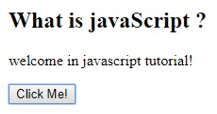
Usage of Comments:
a) It can used to deliver message, suggestions, and warning related to your code in a meaningful manner.
b) Increase code readability.
c) To make some code disable for the compiler
d) Simplify code maintenance
For Example
Suppose we have used 5 variables in our problem. A for addition, S for subtraction, M for multiplication, D for division, R for reminder. To make other programmers understand my code, I can use comment that I have used 5 variables for the code.
In JavaScript, Comments are also of two type's i.e. Single line and multi-line like other programming languages.
Single Line
Single line comments can be represented through double forward slashes (//). We can use it on both before as well as after statement depending upon the situation.
Let's demonstrate this concept through two examples:
Ist Program
<script>
// Single line comment
document.write("WELCOME STUDENTS");
</script>
2nd Program
<script>
var p=40; // Declare p
var q=20; // Declare q
var r=p-q; // It adds values of  p and q variable
document.write(r); // prints subtraction
</script>
Multi-line Comments
Multiline comments are used for providing small description about your code. These can be used with forward slash along with asterisk
Example
/* code description */
How one can change the content in JavaScript through getElementById()
Example
<!DOCTYPE html>
<html>
<body>
<h2> What is JavaScript ? </h2>
<p id="demo"> JavaScript is scripting language lets start tutorial </p>
<button
 type="button"
onclick='document.getElementById("demo").innerHTML="welcome in
javascript tutorial!"'> Click Me! </button>
</body>
</html>
JavaScript can modify HTML styles demonstrated in output
Output:

Share:



Comments
Waiting for your comments